Use Your Sunday Sermons To Attract More Sunday Visitors

I'm convinced that every Church should leverage their Sunday morning sermon videos to attract more Sunday morning visitors.
How To Make Your Church More Visible Online
This strategy helps digital ministry for Church marketing and makes your church more visible online in several ways:
Church SEO (Internal Linking)
Location Specific Tags
Keyword Density and topic specific SME
Follow up content for first time visitors
Here's exactly how I would do it.
Step 1: Export Your Videos For Custom HTML
First, make sure your Sunday morning videos are recorded (obviously). Churches can livestream to Youtube or Facebook and easily export a custom HTML from those platforms into their websites.
Export A Youtube Video
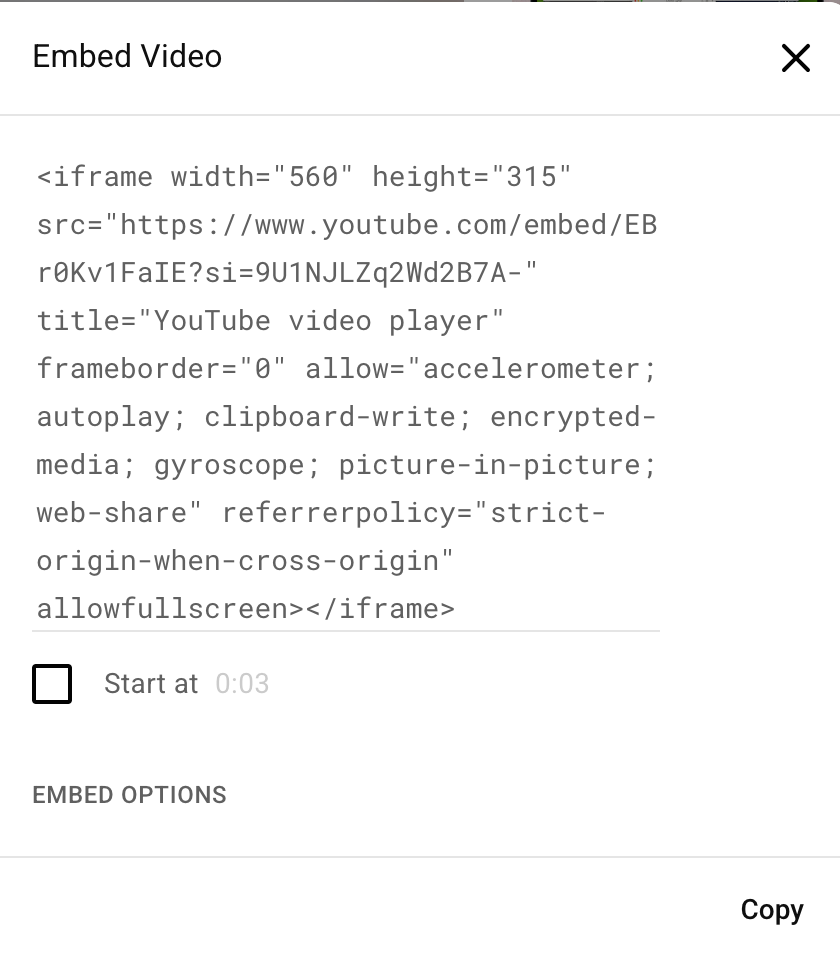
In order to export a YouTube Video, simply go to the video you want to export, click the "share" icon below the video, then select "Embed." Copy your code Now paste into your custom HTML on a blog or sermon overview page (I prefer a separate blog).

Export A Facebook Video
Exporting a Facebook Video is also simply. You'll have to be logged into Facebook in order to do it, but all you have to do is navigate to your Facebook Page, find your video, click the three dots in the top right corner, and select "Embed." Copy your code and paste into your custom HTML widget.
This is important! Start your embedded video when the sermon starts to skip through the worship and communion livestream portion. Facebook allows you to enter your custom starting time.
With will help your readers dive right into the message and improve watch time.

Below is a perfect example of how it could look at the top of your blog page. Now, as you can see the sermon video box is really small with sharp corners. Wix will allow you to change the height and width of the video box (as seen below), but what if you want some futher customization options?
If you want to change your video size, copy your code into ChatGPT and ask it to make certain changes. See the results below:
ChatGPT Command Prompt:
Following is a custom HTML video embed from Facebook. Increase the size of this video to be 650x400. Provide 20px rounded corners with a drop gradient black shadow with 15% opacity.
Facebook Video Code: <iframe src="https://www.facebook.com/plugins/video.php?height=315&href=https%3A%2F%2Fwww.facebook.com%2FSonRiseOBX%2Fvideos%2F4322923217942369%2F&show_text=false&width=560&t=1020" width="560" height="315" style="border:none;overflow:hidden" scrolling="no" frameborder="0" allowfullscreen="true" allow="autoplay; clipboard-write; encrypted-media; picture-in-picture; web-share" allowFullScreen="true"></iframe>
Now you have a fully customizable HTML, with nice rounded corners and a modern design.
Step 2: SEO + Keyword Optimization
Next, you'll want to ensure the title of your blog that describes your post includes your city location and sermon topic. In this case, I would title this post: "A Church That Brings The Light In Kill Devil Hills, NC" or "A Church On A Mission: Bringing The Light Of Jesus In The Outerbanks."
Make sure to include your Keyword (Church) + Location (City, State) in your meta description, page Title, and H1 Title Tag in your blog.
You'll also want to ensure you have a solid framework for title tagging structure on your post. On the heyrick resources page, I've given you a prefer blog framework to use.
Make sure you have:
One H1 Title Tag including your keyword and location
Two H2 Title Tags including your secondary keyword. Your second H2 Title Get should be at the conclusion of your blog article or post and include your CTA (Contact Us, Schedule A Visit, Get In Touch).
Three H3 Title Tags
Title tags are like writing a well-structured research paper to Google. You're providing the topic (H1), Sub-Topic (H2), and supporting points (H3). Every well written research paper ends with a conclusion (CTA). Follow that blue print and you'll start ranking.
Step 3: Content Optimization
Youtube has a unique feature that lets you export the transcript from the video (Auto-generated). This can be a quick and easy way to provide content, but not very helpful to your viewers.
I would suggest taking the sermon outline from the minister and writing simple blog about it. Your goal is to aim for 1000 keywords with at least three H3 subject lines or points provided in the sermon.
However, you can also export the transcript from the video and dump the contents into ChatGPT. Ask it to formulate an SEO structured blog, focusing on Church + City, State as keywords, and mapping out a three point blog covering content within the sermon.
Use that content as an inspirational framework for your own content, updating and optimizing it for SEO.
After you've finished your content, it's time for internal linking.
Step 4: Internal Linking
When it comes to this church marketing strategy, you'll want to provide internal links (just like I've done for church marketing strategy), to your pages on your sight. Google rewards sites with strong internal linking as it helps users navigate your site and find the content they're looking for.
Step 5: Frequently Asked Questions
Provide 3-5 frequently asked questions at the end of your blog to help users get answers to their questions. Again, you can leverage ChatGPT for this, ask the minister for direction, or simply come up with your own questions. Another route is to paste the long-tail keyword phrase into Google and check out the "people also ask" section of Google.
In this case, I searched for "Bring the Light Church" and here are my results:

Continue clicking on questions until you find a few that contextually fit your post. In this case, I make including "What Does Son Rise Church of Christ In The Outer Banks Believe about Bringing The Light?" Does this a few times and you'll find several FAQs for your blog.
Step 6: Call To Action
Every blog or page should end with a call to action (CTA). You can also structure your content to include CTA's two or three times throughout your post.
BONUS Tip: Include three graphics
For the most part, users don't read, they skim, but that's not necessarily the point of this church marketing tactic. The point is for your Church to rank for certain keywords and topics in your city: Relationships, Marriage, Salvation, Theology, Churches for Kids, Youth, Students, Worship, and so on and so forth.
Contact heyRICK For Church Marketing
If you need help with marketing for your church, I'd love to connect with you to discover how I can help. From full-scale website design to PPC ads and Social Media Marketing, I have the skills and capabilities to help your Church reach more visitors.


Comments